Authentication
The Rev79 accepts authentication via long-lived API tokens. These tokens can be generated through the Rev79 UI in Organisation Settings by an App Admin.
Creating an Authentication Token
Warning
The UI for this is in development, and may not be available when you are reading this.
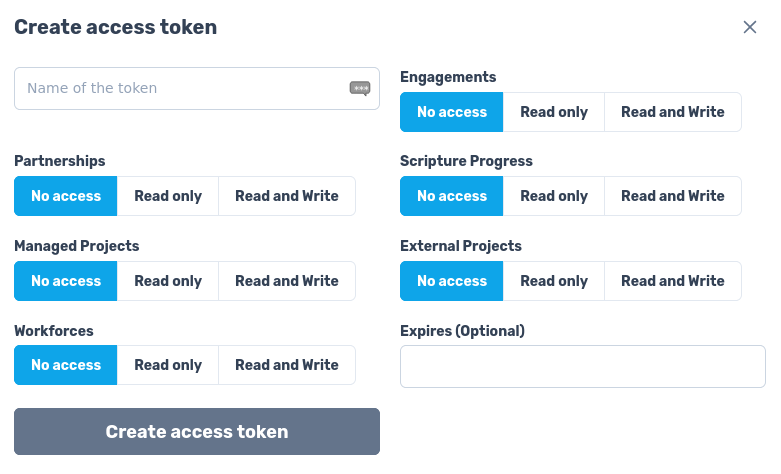
Your organisation's App Admin(s) can generate Rev79 tokens through the Organisation Settings screen. On the "API Access Tokens" you can create an access token by clicking the "Create access token" button in the top-right of the page.

When you generate a token you can choose to provide it with access to different parts of your organisation's data.
Warning
While you can configure tokens with access to your data, the implementation of these permissions is currently incomplete. We will expand this documentation as we flesh out the permissions.
Once you've generated a token, keep track of the API key and secret, as you'll need both to authorise your requests. The secret will only be shown for two minutes after it is created, so make sure to keep track of it!
Making Requests to Rev79
To authorise a request, you will need to calculate a HMAC-SHA256 of the current time (as number of seconds since Unix epoch, UTC) concatenated with your API key.
import hashlib
import hmac
import http.client
import json
import time

# Step 1: assemble our inputs.
current_time = int(time.time())
api_key = {{API_KEY_HERE}} # a string
secret = {{SECRET_HERE}} # a string

# Step 2: produce a HMAC-SHA256 matching Rev79's expectations.
# Note: no colon separating the time from the API key
mac = hmac.new(secret.encode(), f"{current_time}{api_key}".encode(), hashlib.sha256).hexdigest()

# Step 3: assemble our headers.
headers = {
    "content-type": "application/json",
    # Note: a colon separates each element
    "authorization": f"HMAC-SHA256 {current_time}:{api_key}:{mac}"
}

# Step 4: make our request.
# Make a query. This is just a simple example query, but the
# authentication process is the same for all GraphQL requests
body = {"query": "{ organisations { name } }"}
connection = http.client.HTTPSConnection("api.rev79.app")
connection.request("POST", "/graphql", json.dumps(body), headers)
print(connection.getresponse().read().decode())
import crypto from 'node:crypto';

// Step 1: assemble our inputs.
const currentTime = Math.floor(Date.now() / 1000);
const apiKey = {{API_KEY_HERE}}; # a string
const secret = {{SECRET_HERE}}; # a string

// Step 2: produce a HMAC-SHA256 matching Rev79's expectations.
// Node: no colon separating the time from the API key.
const mac = crypto.createHmac('sha256', secret).update(`${currentTime}${apiKey}`).digest('hex');

// Step 3: assemble our headers.
const headers = {
  "content-type": "application/json",
  // Note: a colon separates each element
  "authorization": `HMAC-SHA256 ${currentTime}:${apiKey}:${mac}`
};

// Step 4: make our request.
// Make a query. This is just a simple example query, but the
// authentication process is the same for all GraphQL requests
const body = {"query": "{ organisations { name } }"};
const response = await fetch("https://api.rev79.app/graphql", {
  method: 'POST',
  headers,
  body: JSON.stringify(body)
});
console.log(await response.text());
The Rev79 server will reject requests where the timestamp included in the HMAC is too far away from what it thinks the time is, so please ensure that you are generating a token immediately prior to making your request.
If you are having trouble getting your signatures working, please email the Rev79 development team for help.